Klarast: aus einer Liste wird eine Mindmap
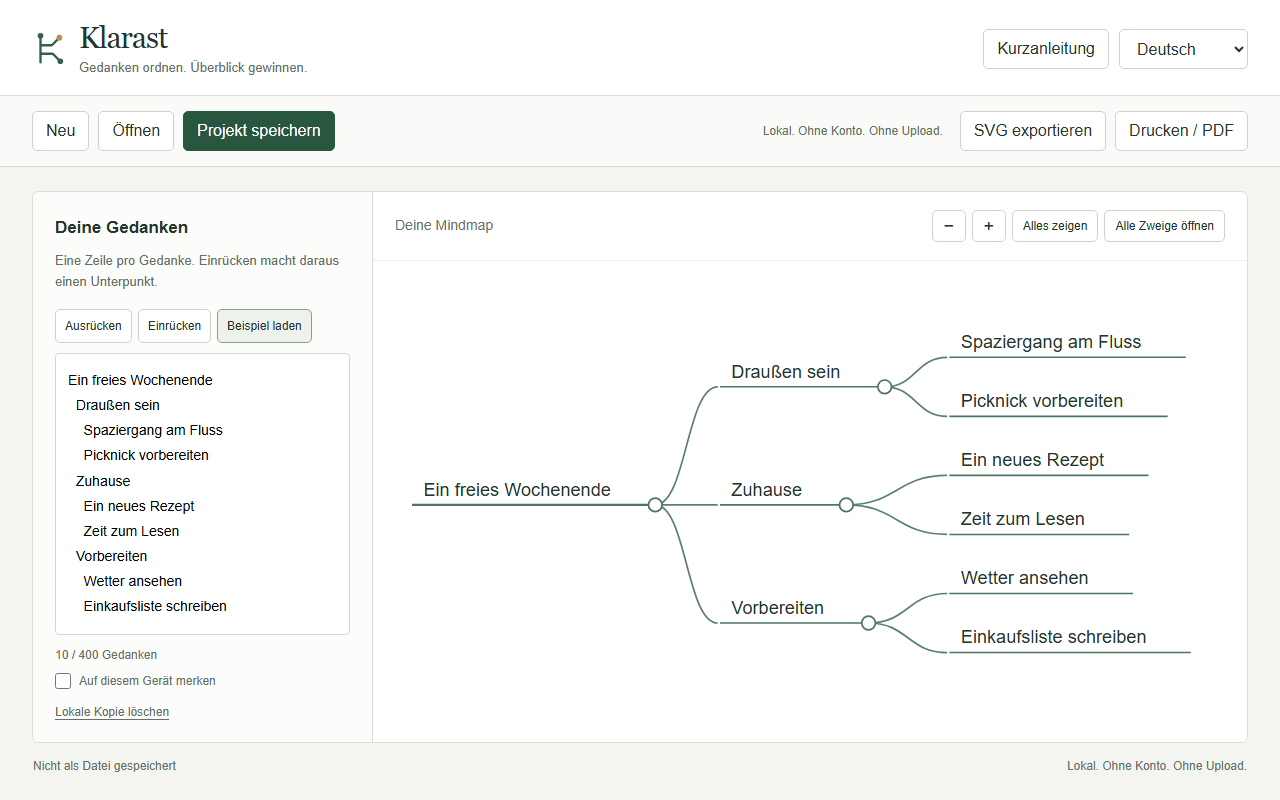
Du schreibst einen Gedanken pro Zeile. Rückst du eine Zeile ein, wird sie ein Unterpunkt. Klarast zeichnet daraus eine Karte, die du zoomen, verschieben und einklappen kannst.
Alles läuft in deinem Browser. Klarast ist eine einzige HTML-Datei: kein Konto, kein Server, kein Abo. Deine Texte verlassen deinen Rechner nicht.
Was drin ist
- Bis zu 400 Gedanken auf 12 Ebenen, je Zeile bis zu 120 Zeichen.
- 18 Vorlagen für Projektplanung, Lernen und Reisen.
- Export als SVG, Druck als PDF über den Browser, Projektdateien zum Weiterbearbeiten.
- Oberfläche auf Deutsch, Englisch, Türkisch, Arabisch (von rechts nach links), Polnisch und Ukrainisch.
- Bedienung per Tastatur: Pfeiltasten verschieben, Plus und Minus zoomen, Enter klappt Zweige ein und aus.
Was es nicht kann
Keine Bilder, keine anklickbaren Links, keine Zusammenarbeit, keine automatischen Updates. Sehr große Karten werden beim Druck auf eine Seite winzig; dann ist SVG besser. Getestet ist Klarast in Chromium und Firefox unter Linux. Edge, Safari, Handys und echte Drucker wurden nicht gesondert geprüft. Empfohlen: aktueller Chrome, Edge oder Firefox am Rechner.
Preis
14 €
Einmal zahlen, kein Abo. Du bekommst ein ZIP mit der Anwendung, einer Anleitung, den Vorlagen und dem Lizenztext. Den Preis nennt der Zahlungsanbieter inklusive Umsatzsteuer.
Bezahlt wird über Polar (polar.sh). Polar ist dein Verkäufer (Merchant of Record), stellt dir die Rechnung und übernimmt die Umsatzsteuer.
Klarast: turn a list into a mind map
Write one thought per line. Indent a line and it becomes a sub-point. Klarast draws the map, and you can zoom, drag and fold it.
Everything runs in your browser. Klarast is a single HTML file: no account, no server, no subscription. Your text never leaves your computer.
What is inside
- Up to 400 thoughts on 12 levels, up to 120 characters per line.
- 18 templates for project planning, studying and travel.
- SVG export, print to PDF through the browser, project files you can edit again.
- Interface in German, English, Turkish, Arabic (right to left), Polish and Ukrainian.
- Keyboard use: arrows pan, plus and minus zoom, Enter folds and unfolds branches.
What it does not do
No images, no clickable links, no collaboration, no automatic updates. Very large maps get tiny when printed on one page; use SVG then. Klarast was tested in Chromium and Firefox on Linux. Edge, Safari, phones and real printers were not tested separately. Recommended: a current desktop Chrome, Edge or Firefox.
Price
EUR 14
Pay once, no subscription. You get a ZIP with the app, a guide, the templates and the license text. The payment provider shows the final price including VAT.
Payment is handled by Polar (polar.sh). Polar is your seller of record (Merchant of Record), issues your invoice and takes care of VAT.